Everything in the app is available over a JSON REST API, so scripts, CI pipelines and AI assistants can plan work, report errors and read monitors. The chapters after this one list every endpoint.
Watch the video: The API and AI assistants
API keys
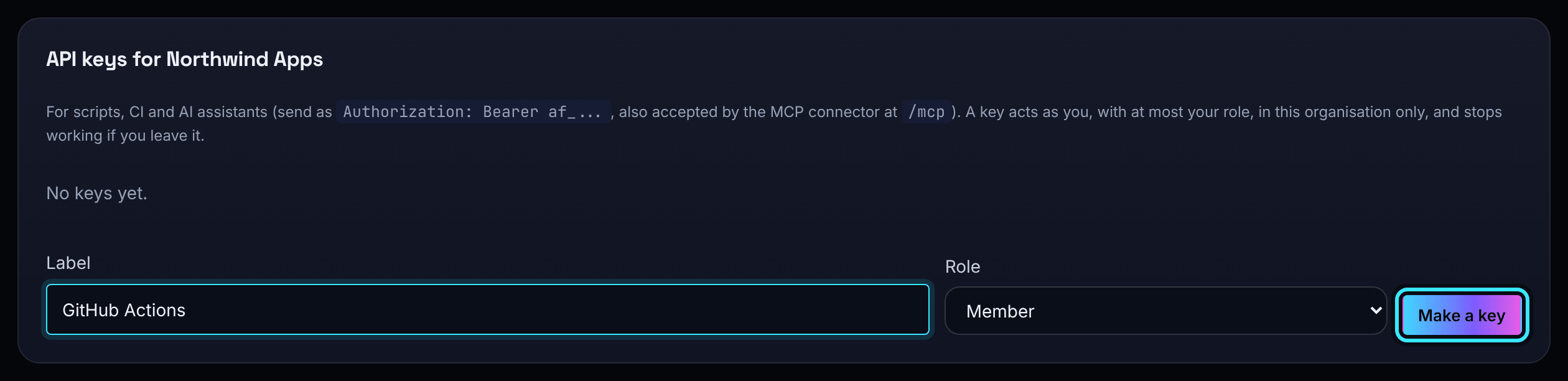
Members, admins and owners can make their own keys under Your account, with a label and a role. A key starts af_ and is shown once. It acts as the person who made it, with the role you choose (never more than theirs). Revoke it from the same page.
- Open Your account and find API keys.
- Type a Label (for example "GitHub Actions") and choose a Role: Viewer, Member or Admin, up to your own role.
- Choose Make a key, then Copy key. It is not shown again.
A key works in one organisation only, drops to your current role if your role is lowered, and stops working if you leave the organisation. Keys cannot be owners, and cannot manage keys, webhooks, billing or account settings. Admins see every key in the organisation and can revoke any of them. Viewers cannot make keys.
Send it on every request as Authorization: Bearer af_... (or X-API-Key). Changes made with a key are recorded in the activity log as your name "via" the key's label.
The REST API
The API lives under https://app.aperioflow.co.uk/api. Projects, phases, tasks and subtasks all follow the same pattern: GET, PATCH and DELETE on /api/projects/{id} and its siblings, and POST to add children. A whole plan can be created in one request, with phases, tasks and subtasks nested inside the project.
curl -X POST https://app.aperioflow.co.uk/api/projects \
  -H "Authorization: Bearer $AF_KEY" -H "Content-Type: application/json" \
  -d '{
    "name": "Launch",
    "phases": [
      { "name": "Build", "tasks": [ { "name": "Write the docs", "priority": "high" } ] }
    ]
  }'
# Tick something off
curl -X PATCH https://app.aperioflow.co.uk/api/tasks/123 \
-H "Authorization: Bearer $AF_KEY" -H "Content-Type: application/json" \
-d '{"status": "done"}'# How far has a project got?
curl https://app.aperioflow.co.uk/api/projects/7 -H "Authorization: Bearer $AF_KEY"The complete reference is the OpenAPI 3.1 file at app.aperioflow.co.uk/openapi.yaml. Import it into Postman, Insomnia or a client generator. The same reference is in the app under API in the main menu, and in the API chapters of this guide.
Requests and answers
- Bodies are JSON (up to 2 MB). Unknown fields are refused with a
400that lists each problem by its path, for examplephases[0].tasks[1].status. - Read-only fields (
id,progress,summary,created_atand so on) and child lists are ignored on update, so you canPATCHback an object you fetched. statusis set on tasks and subtasks only; a phase's and a project's status is worked out from their children, andprogressis worked out by the server.- Lists that can be long take
limit(1 to 500, 50 by default),offset, and for the activity log and issue eventsbefore(ids lower than this). - Everything you do is limited to your organisation; an id from another organisation answers
404as if it did not exist.
Errors are JSON with a sentence you can show a person:
{ "error": "Validation failed", "details": [ { "field": "phases[0].tasks[1].name", "message": "is required" } ] }| Status | Meaning |
|---|---|
| 400 | The request is not valid; details says why |
| 401 | Missing or invalid API key |
| 402 | Your plan's limit is reached |
| 403 | Your role does not allow it (for example "Viewers can look but not change anything") |
| 404 | Not found, or not in your organisation |
| 409 | It conflicts with the current state (for example a project switched off by the plan) |
| 413 | The body is too large |
| 429 | Too many requests; wait as Retry-After says |
Sending a create twice
Add Idempotency-Key: <8 to 100 characters: letters, digits, _ . : -> to a POST, and sending it again with the same body within ten minutes does not do it again: you get the first answer back with Idempotent-Replayed: true. While the first is still running the repeat gets a 409; the same key with a different body gets a 422. Only a request that worked is remembered. An answer that holds a secret shown once, such as a new API key or webhook, is never kept, so its repeat is a 409.
Addresses that need no key
GET /api/healthtells you the API is up.POST /ingest/{key}reports errors with a project's ingest key (see Error reporting).GETorPOST /heartbeat/{token}checks in a heartbeat (see Monitors and heartbeats).
Connect an AI assistant
AperioFlow runs a connector for Claude and other assistants that speak MCP, at https://app.aperioflow.co.uk/mcp. Add it as a custom connector and sign in when asked: it uses OAuth, so you sign in with your own account and the assistant acts as you, in one organisation, with your role. Assistants that cannot sign in through OAuth can use an API key as a bearer token instead.
The tools cover projects, phases, tasks and subtasks, the waiting sections, errors and issues, and the activity log. Everything an assistant does is an ordinary API call by you and shows in the activity log as your name via Claude.
- In Claude, add a custom connector with the address
https://app.aperioflow.co.uk/mcp. - When asked, sign in on AperioFlow's page with your email, password and (if you use it) your authenticator code. If you belong to several organisations, choose which one the assistant works in.
- Ask the assistant about your work, for example "What is blocked in Mobile app 2.0?"
The sign in needs your password, so an account that only uses a passkey or a provider must set a password first (use Forgot your password?). The assistant asks you before it deletes anything or rotates an ingest key. Admins can give every assistant extra instructions under Settings, AI assistants, Notes for assistants. A connection lasts until you stop using it for 90 days or leave the organisation.