Each organisation has one plan. Viewers are free on every plan.
The plans
| Free | Solo | Team | |
|---|---|---|---|
| Price a month | £0 | £8 | £29 |
| People (viewers are free) | 1 | 1 | Up to 10 |
| Projects | 3 | Unlimited | Unlimited |
| Error events a month | 5,000 | 50,000 | 250,000 |
| Monitors | 10 | 30 | 100 |
| Fastest check | Every 5 minutes | Every 1 minute | Every 1 minute |
| Status pages | 1 | 3 | 5 |
| Coolify checks | No | Yes | Yes |
| History kept | 14 days | 90 days | 12 months |
The figures on this page come from the same place as the limits the app enforces.
See your plan and usage
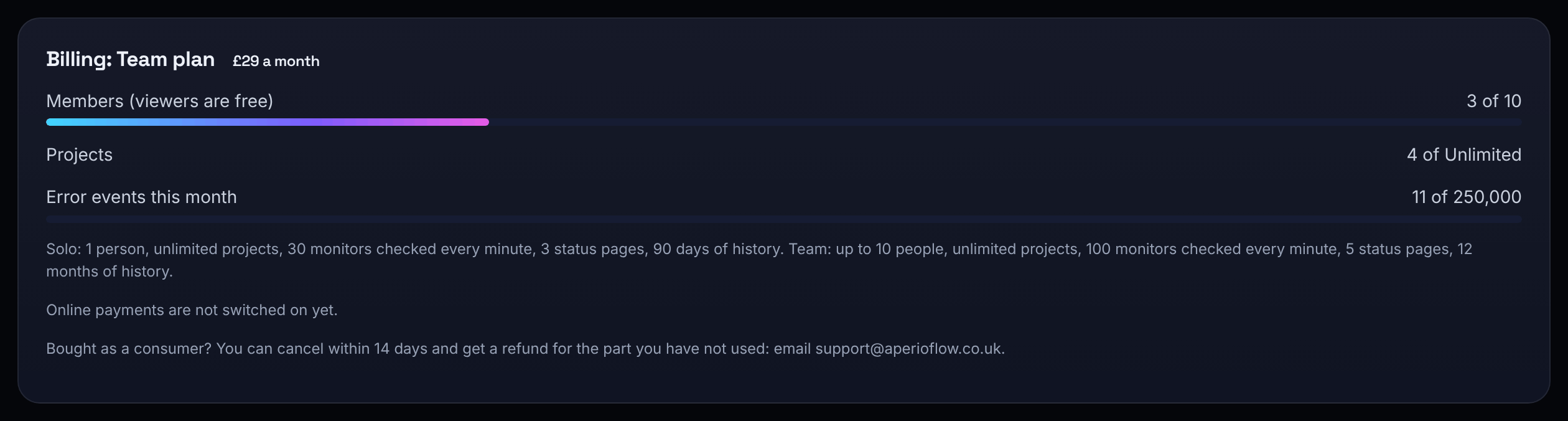
Open Settings and find Billing. It shows the plan and its price, whether the subscription renews or ends and when, and meters for Members (viewers are free), Projects and Error events this month.
Upgrade
Only owners can change the plan, signed in with their own account.
- Under Billing, choose Upgrade to Solo or Upgrade to Team.
- Read Before you pay: who we are, what you are buying, the price, how renewal and cancelling work, and your right to cancel.
- Tick that you want the plan to start now and have read it, then choose Continue to payment.
- Pay by card on Stripe's secure page. You come back to AperioFlow on the new plan.
Plans are paid monthly in advance by card through Stripe, and renew until you cancel. Owners get a reminder before each renewal and an email confirming a purchase.
Change plan, card or invoices, or cancel
Choose Manage billing to open Stripe's billing portal, where owners change plan, update the card, download invoices or cancel. A cancelled plan says "Ends" with the date, then moves to Free; history older than the Free plan keeps is then deleted.
If a payment fails, the plan carries on while Stripe tries again, and owners are emailed. Update the card under Manage billing.
Bought as a consumer? You can cancel within 14 days and get a refund for the part you have not used: email support@aperioflow.co.uk.
When you reach a limit
- Adding a person, a project or a monitor beyond your plan is refused with a message saying what the plan includes and to upgrade in Settings, Billing.
- When the month's error events are used, new events are dropped until the next calendar month, and owners are emailed once.
When you are over a limit
If your organisation has more than its plan allows (for example after moving to a smaller plan), nothing is deleted. The newest projects, monitors and members are switched off until you are within the limits, and owners are emailed a list.
- A switched-off project can be read and deleted, but not changed, and records no errors.
- A switched-off monitor is not checked.
- A switched-off member is signed out; their account and work stay. Owners and viewers are never switched off.
Switched off because of your plan under Billing lists them. Choose which stay on by switching one off, then another on (admins for projects, owners for members). Upgrading switches them back on by itself.