AperioFlow groups the errors your apps report into issues, next to the work in the same project. Reporting is one HTTP request.
Find your ingest URL
Open a project and choose Set up reporting (or Setup in its Issues panel). You get an ingest URL of the form https://app.aperioflow.co.uk/ingest/<key>, with ready-made snippets and a button to rotate the key.
The URL needs no API key and allows any origin, so you can use it in browser and mobile code. Anyone who has the URL can add events to that project (and only that project), so rotate the key if it leaks. A key is limited to 300 events a minute.
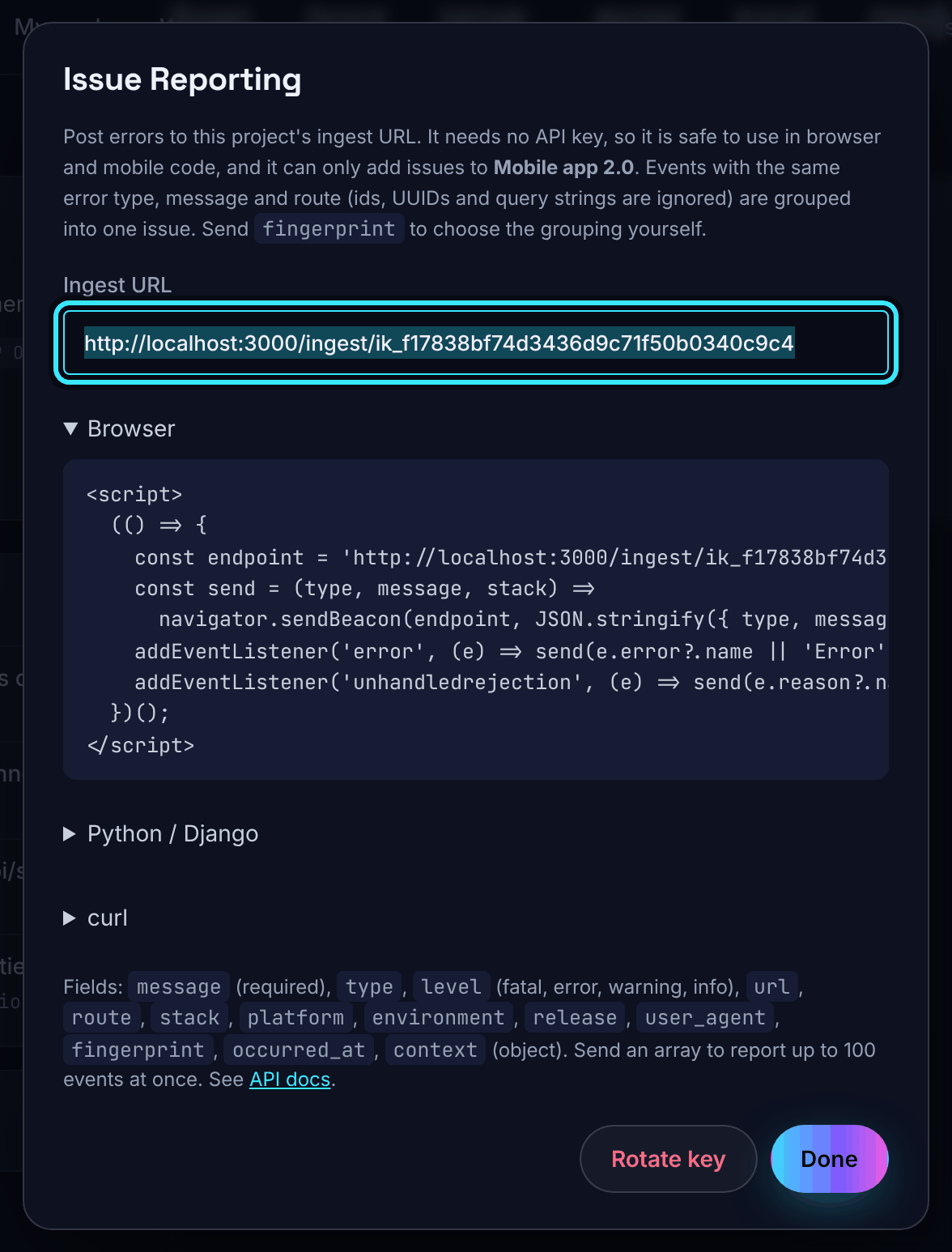
From a browser
<script>
  (() => {
    const endpoint = 'https://app.aperioflow.co.uk/ingest/YOUR_KEY';
    const send = (type, message, stack) =>
      navigator.sendBeacon(endpoint, JSON.stringify({ type, message: String(message), stack, url: location.origin + location.pathname, platform: 'web' }));
    addEventListener('error', (e) => send(e.error?.name || 'Error', e.message, e.error?.stack));
    addEventListener('unhandledrejection', (e) => send(e.reason?.name || 'UnhandledRejection', e.reason?.message ?? e.reason, e.reason?.stack));
  })();
</script>
From Node
async function reportError(err, extra = {}) {
  await fetch('https://app.aperioflow.co.uk/ingest/YOUR_KEY', {
    method: 'POST',
    headers: { 'Content-Type': 'application/json' },
    body: JSON.stringify({
      type: err.name,
      message: err.message,
      stack: err.stack,
      platform: 'node',
      environment: process.env.NODE_ENV || 'production',
      ...extra,
    }),
  }).catch(() => {}); // reporting must never break the app
}

process.on('uncaughtException', (err) => reportError(err));
process.on('unhandledRejection', (reason) => reportError(reason instanceof Error ? reason : new Error(String(reason))));
From Python
import requests, traceback

def report_error(exc, request=None):
    requests.post("https://app.aperioflow.co.uk/ingest/YOUR_KEY", timeout=2, json={
        "type": type(exc).__name__,
        "message": str(exc),
        "stack": "".join(traceback.format_exception(exc)),
        "url": request.build_absolute_uri().split("?")[0] if request else None,
        "platform": "django",
        "environment": "production",
    })
From anything else
curl -X POST https://app.aperioflow.co.uk/ingest/YOUR_KEY \
  -H "Content-Type: application/json" \
  -d '{"type":"TypeError","message":"Invoice 42 not found","url":"https://app.example.com/invoices/42"}'
A successful report answers 202 with how many events were accepted and, for each, the issue it joined and whether it was new or reopened. You can send one event, or an array of up to 100 events in one request.
What you can send
Only message is required. The other fields are type, level (fatal, error (the default), warning or info), url, route, stack, platform, environment, release, user_agent, fingerprint, occurred_at and context (a JSON object of up to 20 KB).
| Field | Up to |
|---|---|
| message | 10,000 characters |
| type | 200 characters |
| url | 2,000 characters |
| route | 500 characters |
| stack | 50,000 characters |
| platform, environment | 100 characters each |
| release | 200 characters |
| user_agent | 500 characters (taken from the request when you leave it out) |
| fingerprint | 200 characters |
| occurred_at | An ISO 8601 time (now, when left out) |
Any other field is refused with a 400 that lists it.
Send as little personal data as you can: none in message, url, stack or context, and no passwords or tokens anywhere. Leave query strings and fragments out of url. Events are kept for your plan's history period (14 days on Free, 90 days on Solo, 12 months on Team), then deleted.
How errors are grouped
Events with the same fingerprint share one issue. If you do not send a fingerprint, it is built from the error type, the first line of the message with numbers, UUIDs and email addresses masked (so Invoice 42 not found and Invoice 97 not found are one issue), and the route: the path only, with ids replaced, so /invoices/42/edit?tab=lines becomes /invoices/:id/edit. Send route to set it yourself.
The same error on two routes makes two issues. A resolved issue that happens again is reopened. An ignored issue stays ignored but keeps counting. The latest 50 events of each issue are kept, and how long events are kept depends on your plan.
Useful links on an issue
Put context.links on an event, as [{"label": "Deploy", "url": "https://..."}], and the issue shows them as links. Only http and https addresses are shown.
Limits
- 300 events a minute for each project. Above that, reports get a
429withRetry-After: "Too many events. Slow down and try again shortly." - Error events a month for the organisation: 5,000 on Free, 50,000 on Solo and 250,000 on Team. When the month's allowance is used, new events are dropped (not queued) until the next calendar month, and owners get one email saying so.
- A project switched off by your plan records no new events.
Rotate the ingest key
If an ingest URL leaks, an admin or owner opens Set up reporting and chooses Rotate key. The old URL stops working at once, so update your apps with the new one. The 300-a-minute limit counts per project, so rotating does not reset it.
Report with your API key instead
Server code that already holds an API key can post the same events to POST /api/projects/{id}/issues. See API: errors, issues and push.